

LAMA ERP is a fully integrated business management system designed for growing businesses of any size — from small traders to multi-warehouse operations. It covers the complete order-to-cash and procure-to-pay cycles, giving your team a single source of truth for customers, stock, finances and production.
Core Modules at a Glance
Typical Daily Workflow
Open your web browser and navigate to the LAMA ERP address provided by your administrator. You will be greeted by the sign-in screen.
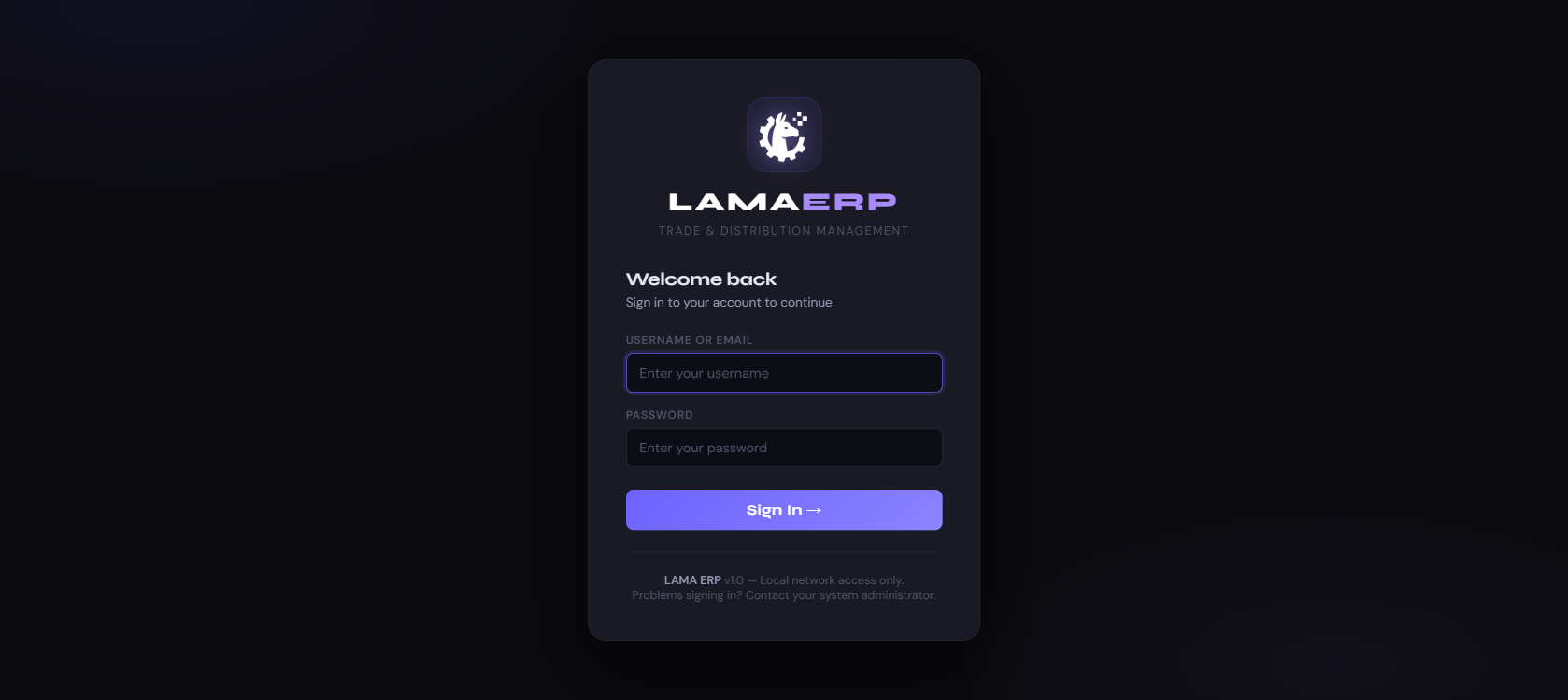
Sign In Steps
- Enter your Username or Email in the first field.
- Enter your Password in the second field.
- Click Sign In → to access the system.
Interface Overview
| Element | Description |
|---|---|
| Sidebar | Main navigation menu on the left. Groups modules into Sales, Warehouse and Finance sections. Can be collapsed with the ☰ button. |
| Top Bar | Shows the current module name, global search (⌘K), theme toggle (🌙/☀) and notification bell. |
| Page Body | Main working area — lists, forms, detail views and dashboards. |
| Action Menus | The ··· button on each table row opens a context menu with quick actions (View, Edit, etc.). |
| Flash Messages | Green = success, Red = error. Always read the flash after submitting a form. |
The Dashboard is the first screen you see after logging in. It gives a real-time overview of business health and surfaces the items that need your attention today.
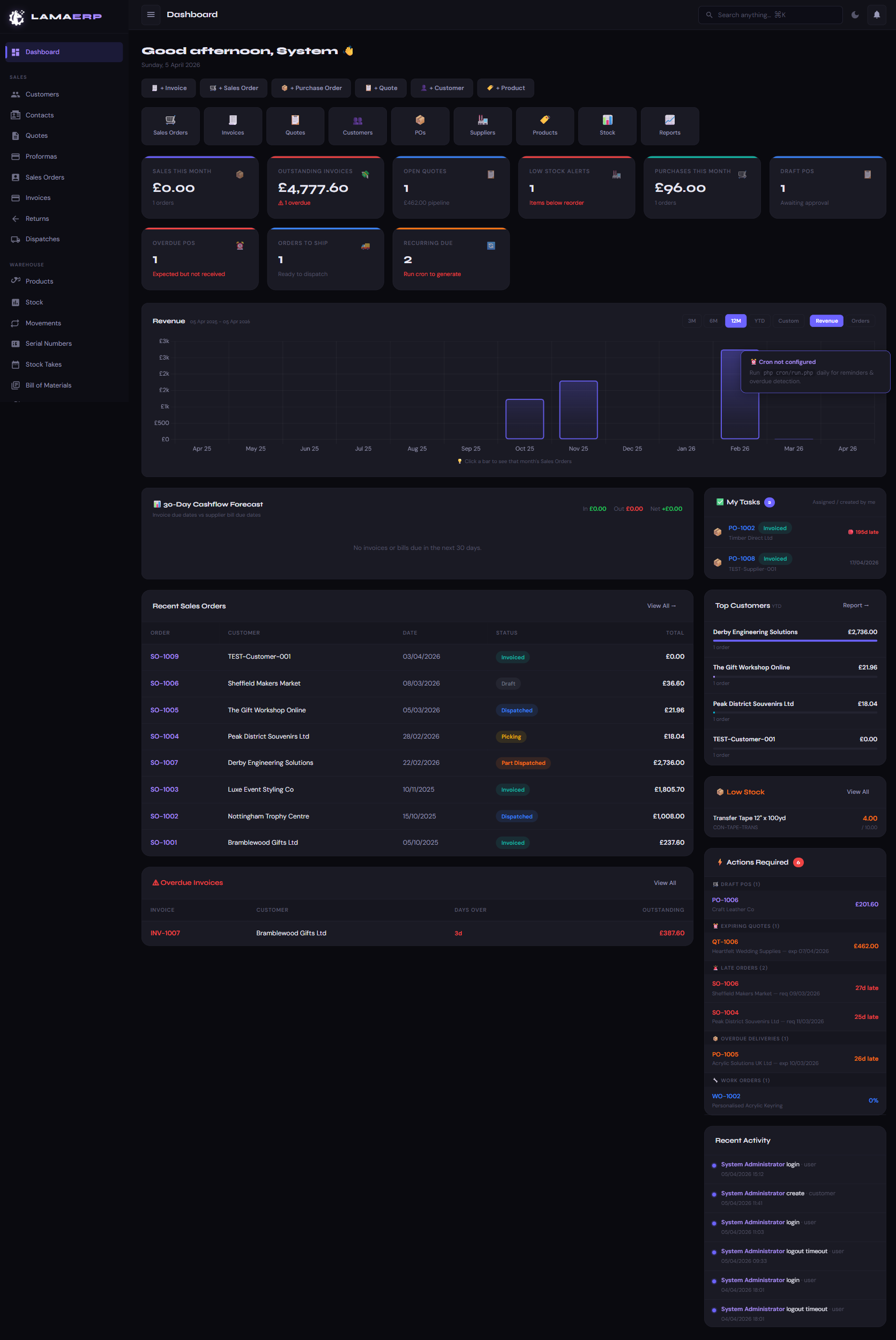
Dashboard Sections
| Section | What it shows |
|---|---|
| Quick Create | One-click buttons to raise a new Invoice, Sales Order, PO, Quote, Customer or Product. |
| KPI Cards | Sales this month, outstanding invoices, open quotes, low stock alerts, purchases this month, draft POs. |
| Action Cards | Overdue POs, orders to ship, recurring invoices due — items requiring immediate action. |
| Revenue Chart | Monthly revenue bar chart. Toggle between 3M / 6M / 1Y / Custom. Click a bar to see that month's orders. |
| 30-Day Cash Flow | Forecast of incoming (invoices due) vs outgoing (bills due) over the next 30 days. |
| Recent Sales Orders | Latest 8 orders with status and value for quick reference. |
| My Tasks | Documents assigned to you that are overdue or need action. |
| Top Customers | Ranked by YTD revenue. Click Report → for full customer activity report. |
| Low Stock | Products at or below reorder level. Click View All to go to the stock module. |
| Actions Required | Smart list of overdue invoices, late orders, unshipped dispatches, incomplete work orders. |
| Recent Activity | Audit trail of recent logins, creates and updates across all modules. |
The Customers module is the heart of your sales operation. Every quote, order and invoice is linked to a customer account.
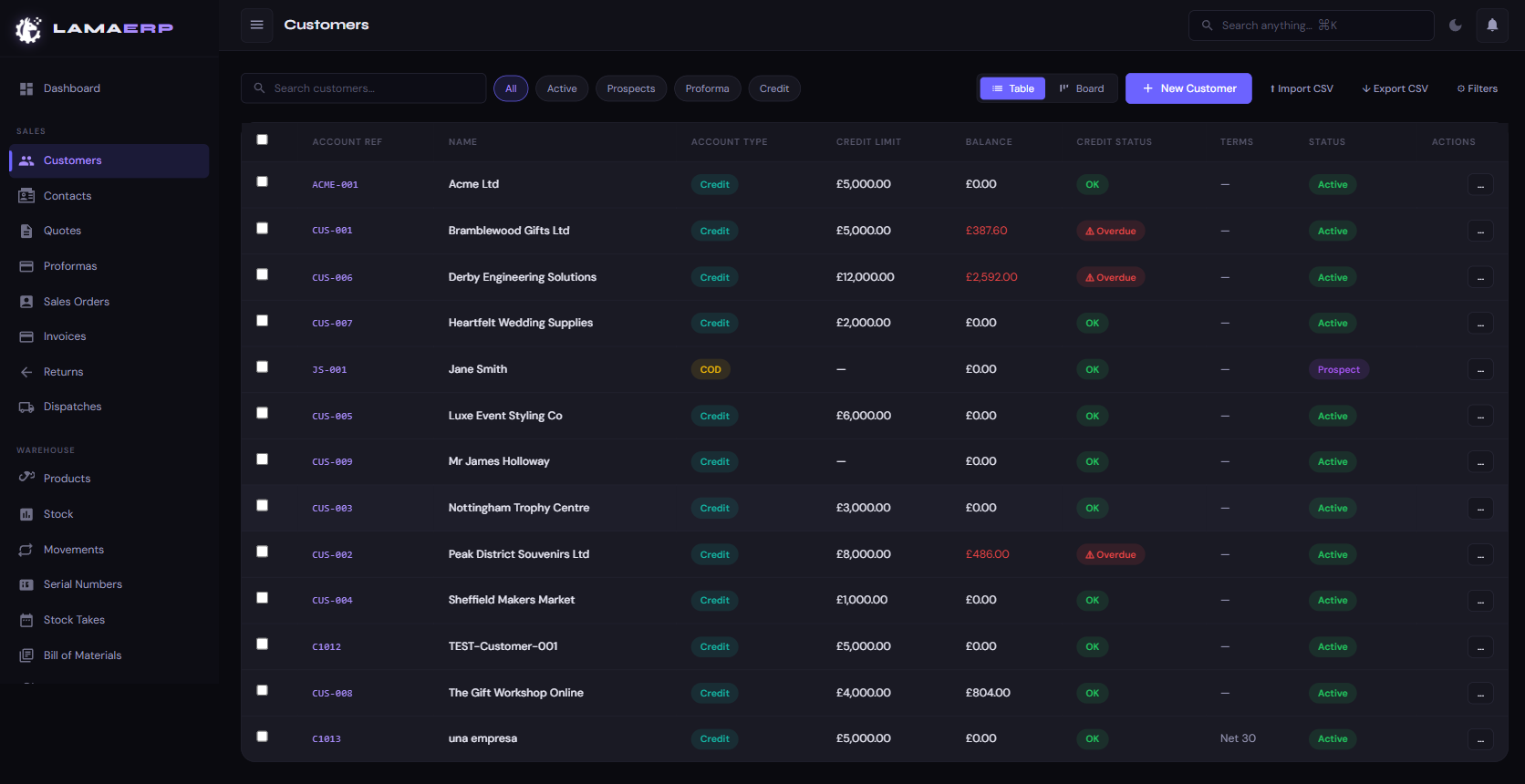
Customer List Views
Use the Table view for a detailed list with columns for Account Ref, Name, Type, Credit Limit, Balance, Credit Status, Terms and Status. Switch to Board view for a Kanban-style layout grouped by status.
Filter tabs: All · Active · Prospects · Proforma · Credit. Use the search bar for live name/reference filtering.
Customer Account Record
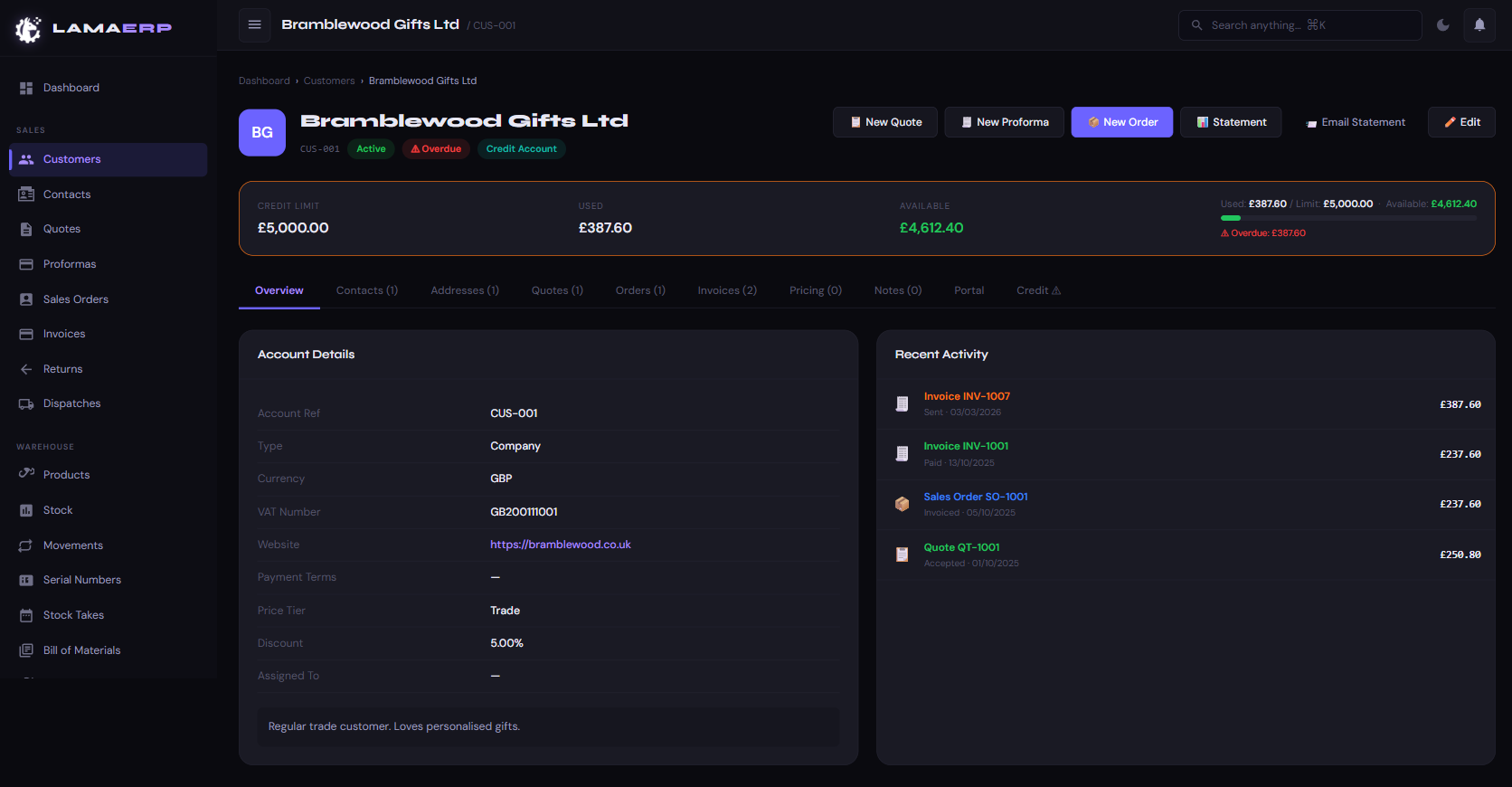
Each customer record has tabbed sections:
| Tab | Contents |
|---|---|
| Overview | Account details (type, currency, VAT, terms, price tier, discount) and recent activity timeline. |
| Contacts | Named contacts with phone, email and role. Used to address emails and documents. |
| Addresses | Delivery addresses. Multiple addresses supported — select at order time. |
| Quotes | All quotes raised for this customer. |
| Orders | All sales orders linked to this account. |
| Invoices | All invoices — outstanding, paid and overdue. |
| Pricing | Product-specific price overrides for this customer. |
| Notes | Free-text notes with timestamp and author. |
| Portal | Customer portal access link management. |
| Credit | Credit hold controls and credit history. |
Credit Bar
The coloured bar at the top of each customer shows Credit Limit / Used / Available. Red indicates overdue invoices are blocking the account.
Creating a Customer
- Click + New Customer in the top-right of the customer list.
- Fill in Name, Account Ref, Type (Company / Individual / COD / Proforma), Currency and Terms.
- Optionally set Credit Limit, Price Tier and VAT number.
- Click Save Customer.
Importing Customers via CSV
Click ↑ Import CSV. Download the template, populate your data, upload the file. A preview shows any validation errors before you commit the import.
Contacts are the named people within a customer account — the buyer, accounts payable contact, or decision-maker. They can be managed from the Contacts sidebar link (global list) or from within each customer's Contacts tab.
Contact Fields
| Field | Description |
|---|---|
| Name | First and last name |
| Role / Job Title | Their position (e.g. Buyer, Finance Director) |
| Used for emailing quotes, invoices and statements | |
| Phone / Mobile | Direct line and mobile number |
| Primary | Marks the main contact — used as default email recipient |
Quotes are formal price proposals sent to customers. Once accepted, a quote is converted to a Sales Order in one click.
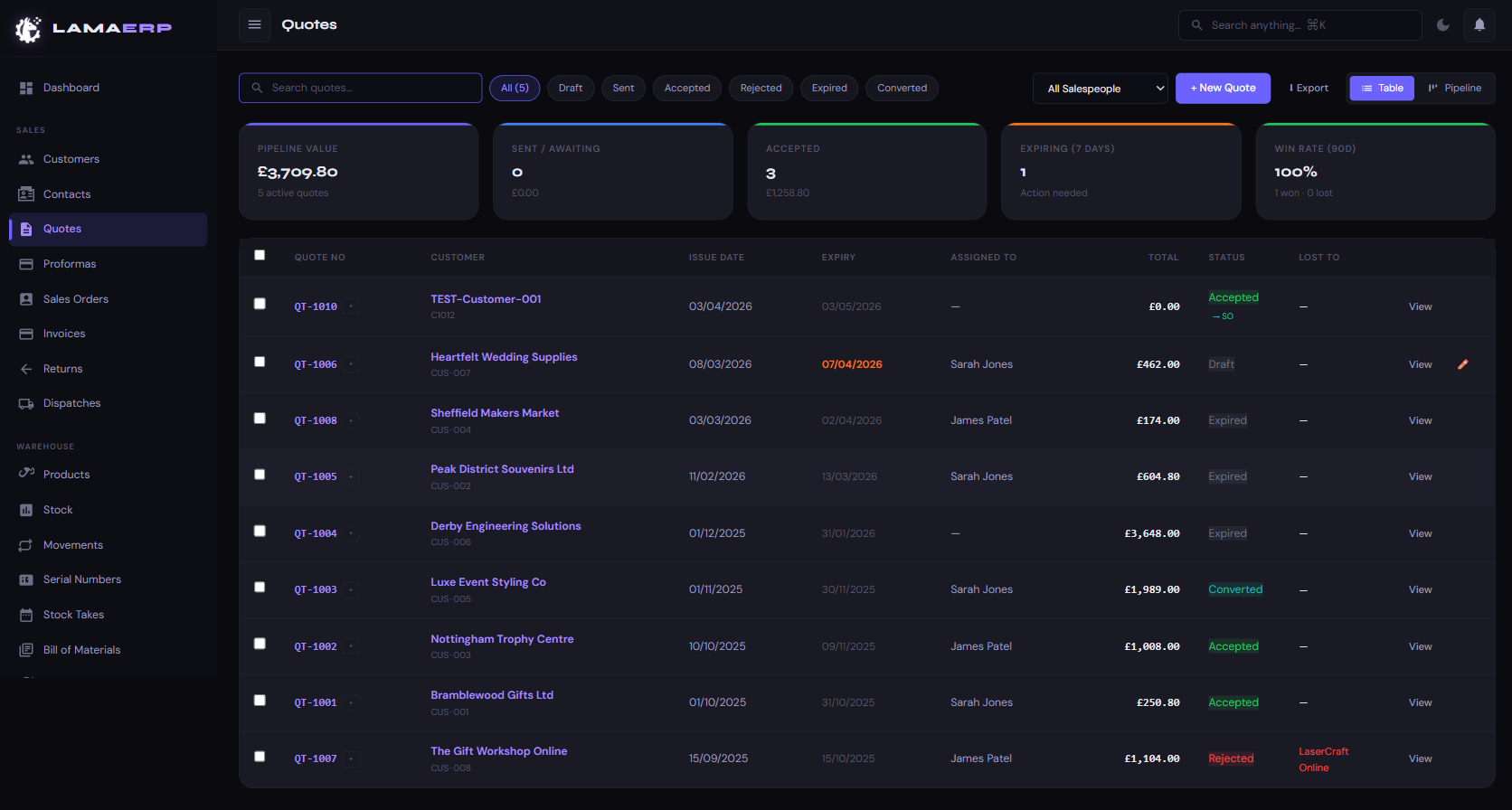
Quote Statuses
Creating a Quote
- Click + New Quote.
- Select the Customer — prices and discount auto-populate from their account.
- Set Issue Date and Expiry Date.
- Add line items: search for products by name or SKU. Quantity, unit price and VAT are auto-filled.
- Add a discount per line or an overall quote discount if needed.
- Add any notes for the customer (printed on the PDF).
- Click Save to create as Draft, or Save & Send to email the PDF immediately.
Converting a Quote to a Sales Order
Open the accepted quote and click Convert to Order →. All line items, pricing and customer details are carried across automatically.
Pipeline & Views
Switch between Table and Pipeline views. The Pipeline view shows quotes grouped by status with totals, win rate over the last 90 days, and expiring-soon alerts.
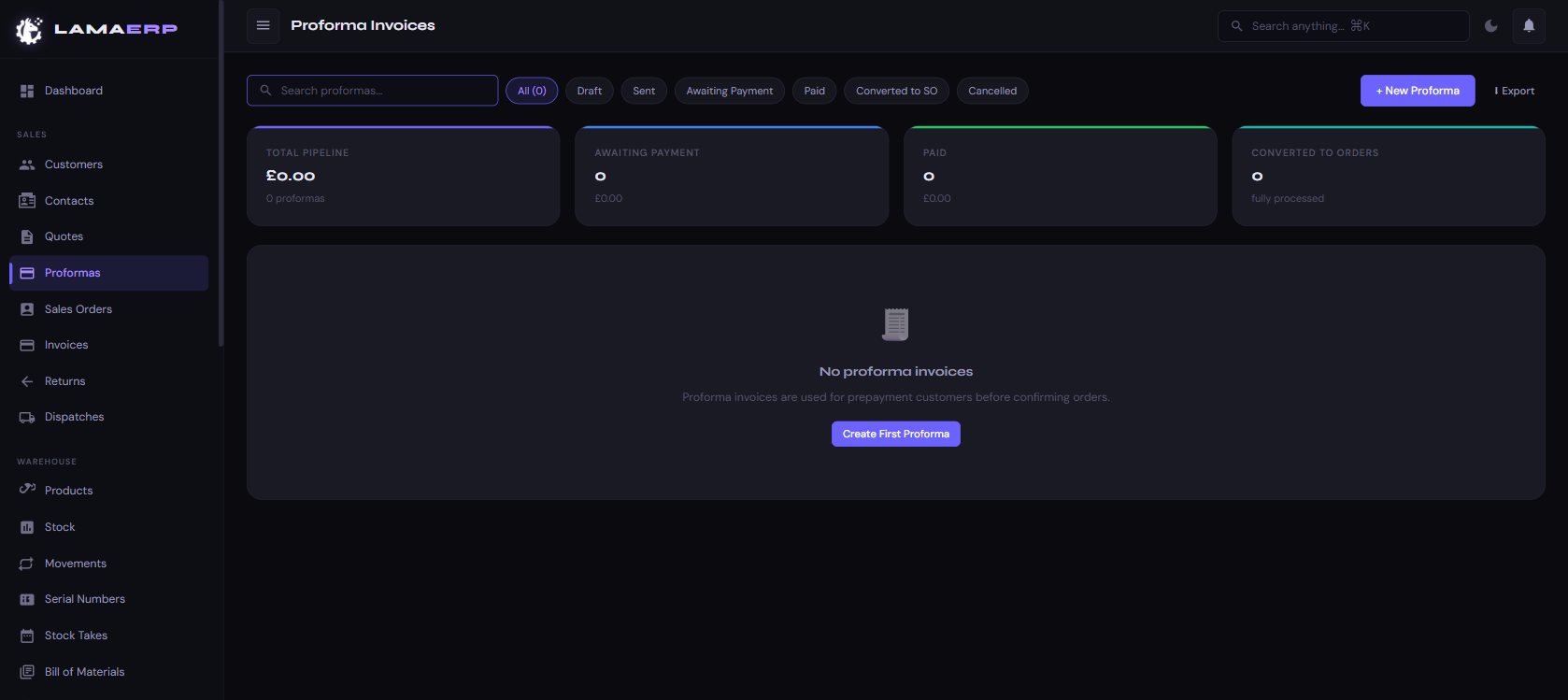
A Proforma Invoice is a preliminary bill sent to a customer before goods are shipped, typically to request payment upfront. It is not a tax invoice.
Proforma Statuses
Once marked Paid, a Proforma can be converted into a full Sales Order, triggering the normal dispatch and invoicing workflow.
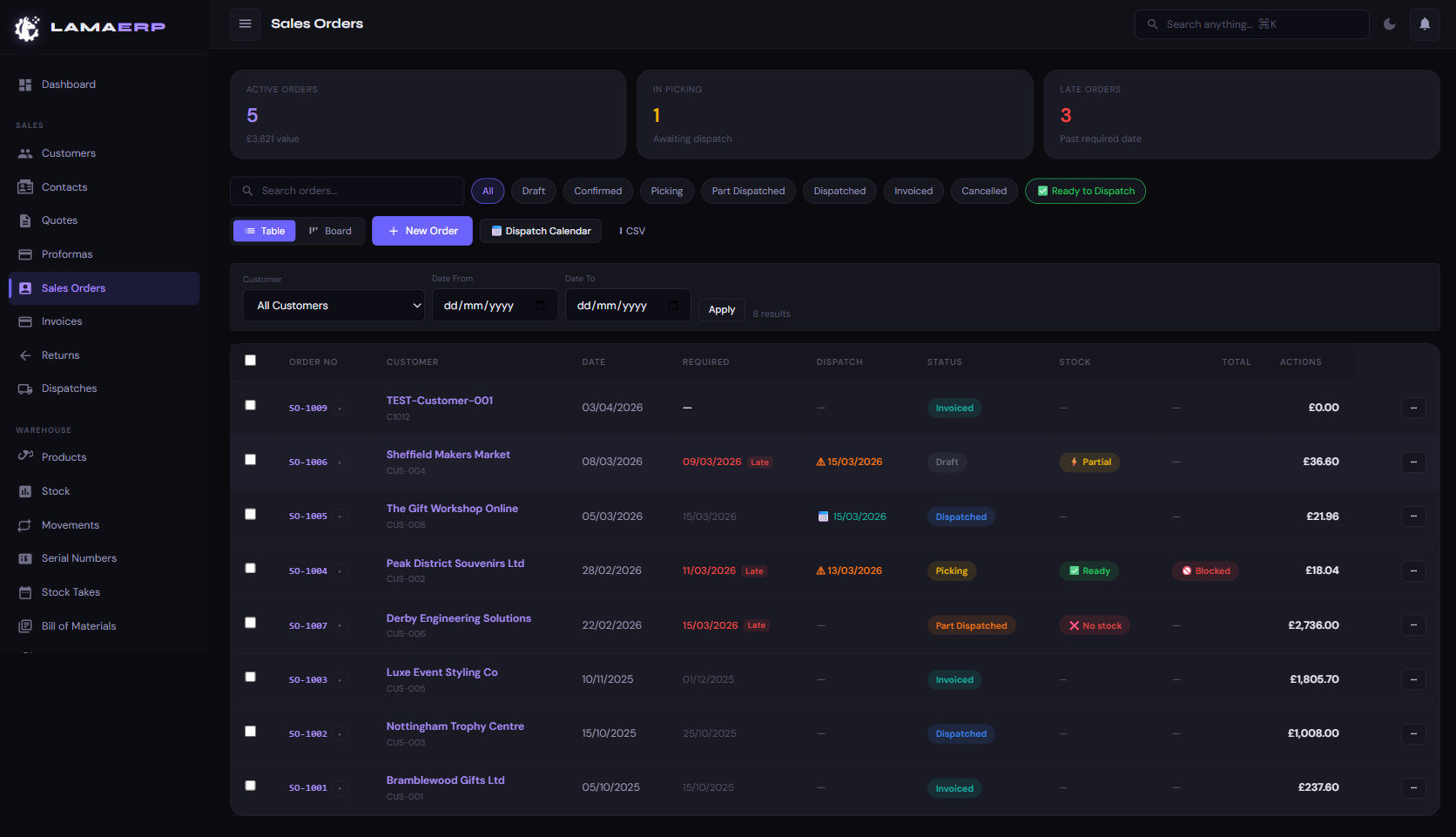
Order Statuses
Stock Indicators on Orders
| Indicator | Meaning |
|---|---|
| ✔ Ready | All lines have sufficient available stock to fulfil |
| ⚡ Partial | Some lines can be fulfilled but not all |
| ✕ No Stock | Stock is insufficient — raise a Purchase Order |
| 🚫 Blocked | Customer account is on credit hold — dispatches blocked |
Order Workflow
Customer PO Reference
The Customer PO No. field stores the customer's own purchase order number. This appears on the order PDF and in the customer portal so customers can match documents to their own systems.
Required Date & Late Orders
Setting a Required Date on an order enables the late-order tracking shown in red on the list. The Dashboard also shows a Late Orders count for orders past their required date.
Dispatch Calendar
Click 📅 Dispatch Calendar on the Sales Orders list to see a calendar view of expected dispatch dates — useful for planning picking schedules.
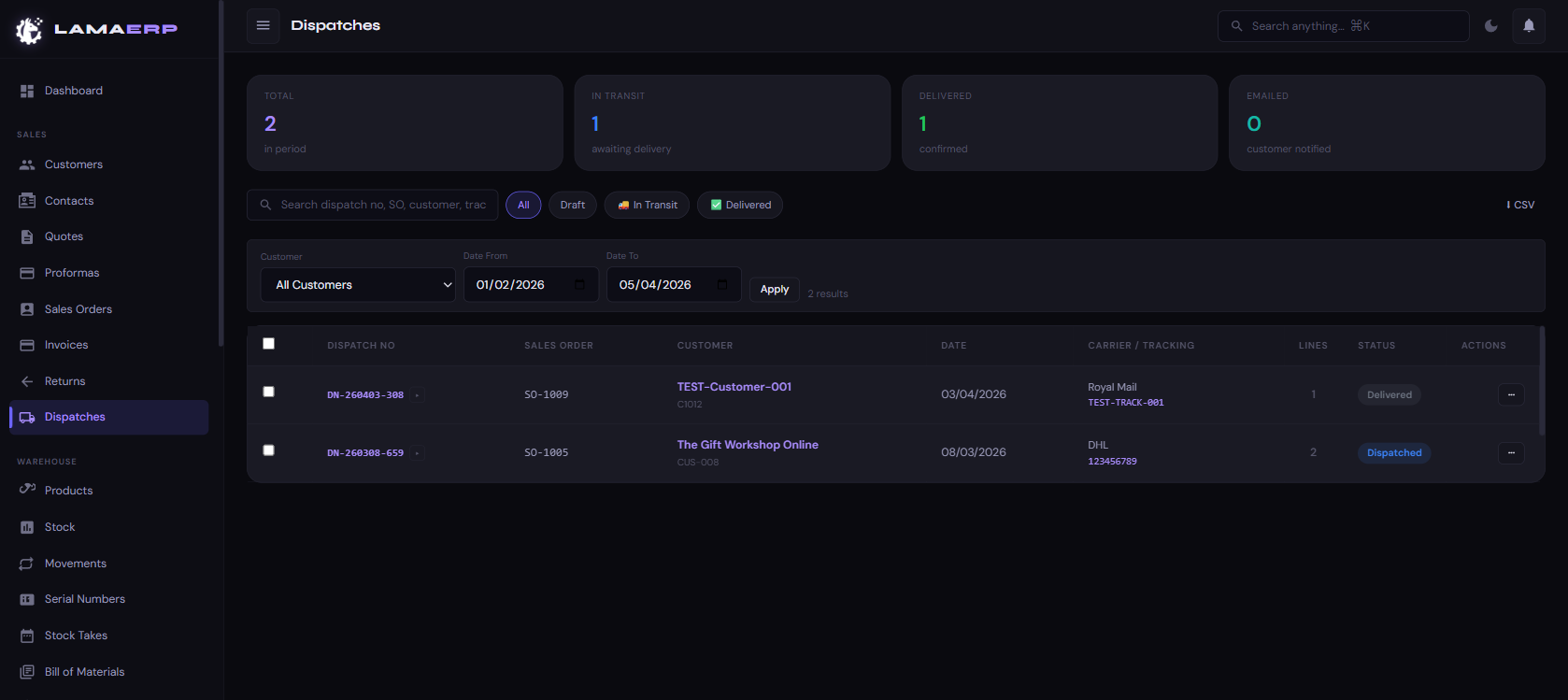
A Dispatch Note (DN) is created when goods are shipped against a Sales Order. Stock levels are decremented at dispatch time.
Creating a Dispatch
- Open the Sales Order and click Create Dispatch.
- Enter the Carrier (e.g. Royal Mail, DHL) and Tracking Number.
- Select the quantities to ship for each line (partial dispatches are supported).
- Click Dispatch — stock is deducted and the order moves to Dispatched or Part Dispatched.
- Click Email Customer to send the dispatch notification with tracking details.
Dispatch Statuses
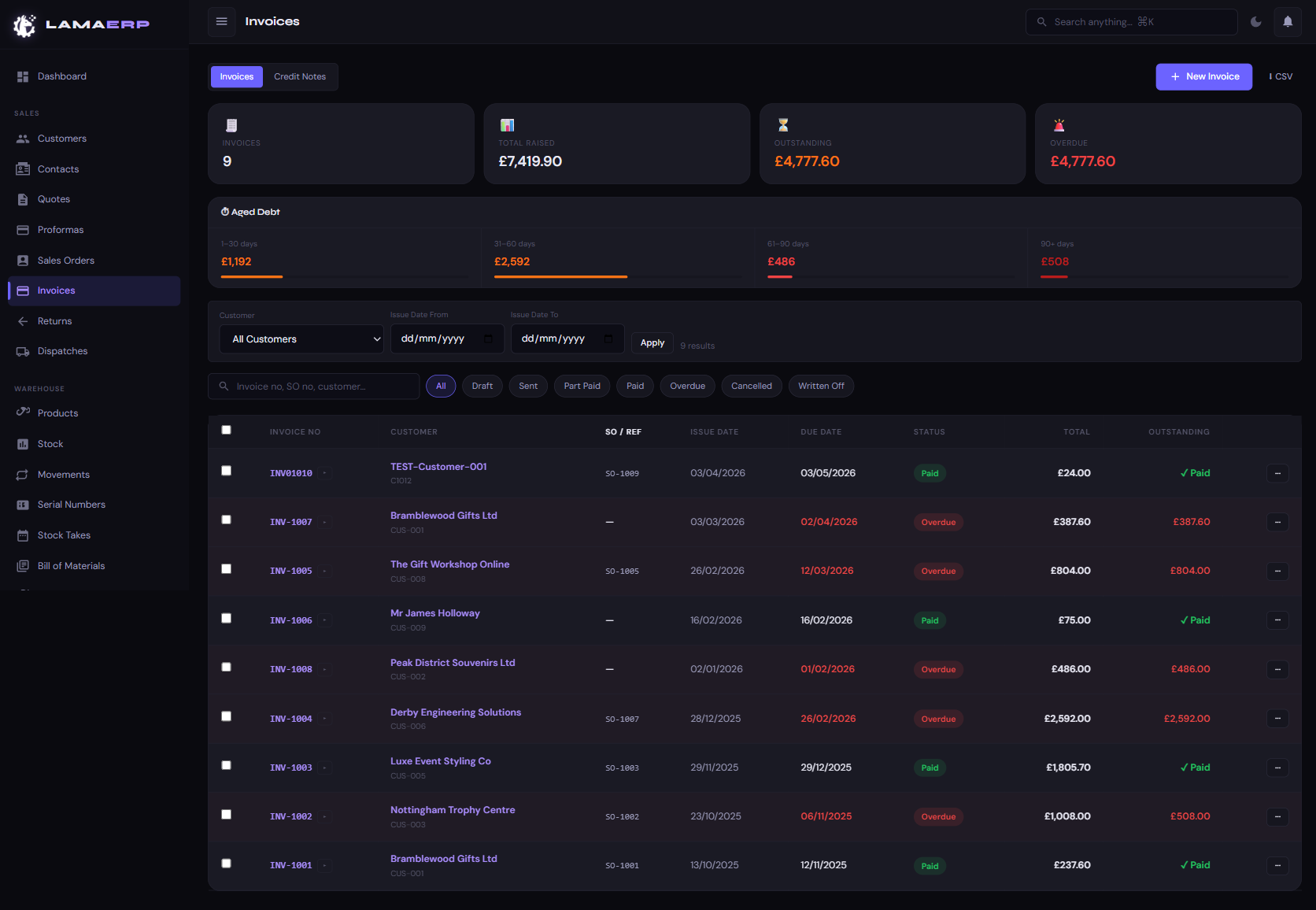
Invoice Statuses
Aged Debt Panel
The top of the Invoices page shows outstanding amounts broken down by age bucket: 1–30 days · 31–60 days · 61–90 days · 90+ days. Use this to prioritise chasing.
Recording a Payment
- Open the invoice and click Record Payment.
- Enter the payment Date, Amount and Method (BACS, card, cash, etc.).
- If partial, the invoice moves to Part Paid. Full payment moves it to Paid.
Credit Notes
To issue a credit note, switch to the Credit Notes tab and click + New Invoice (credit notes have negative values). Credit notes can be allocated against outstanding invoices.
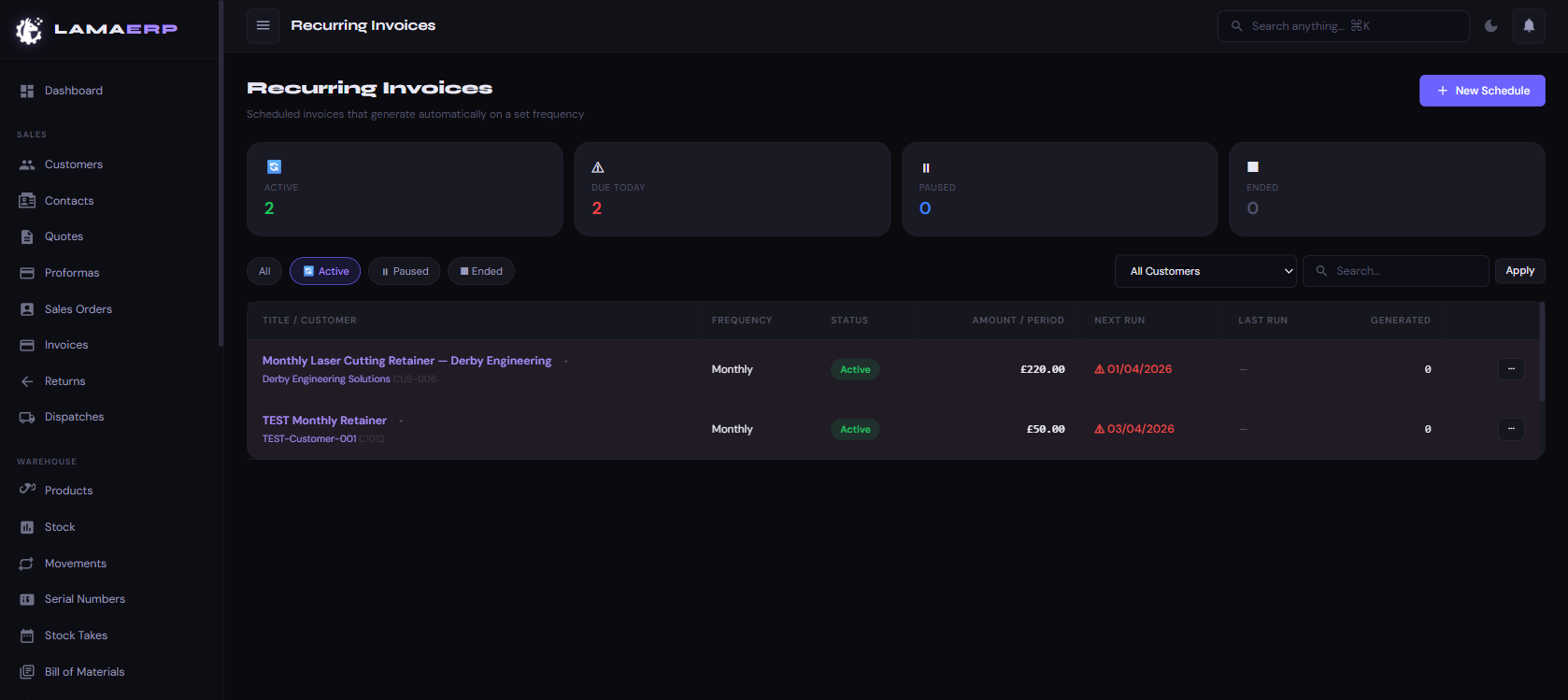
Recurring Invoices automate regular billing — retainers, subscriptions or monthly service fees. The system generates a new invoice automatically on each due date when the scheduled task runs.
Setting Up a Recurring Schedule
- Click + New Schedule.
- Select the Customer and enter a Title.
- Set Frequency: Weekly, Monthly, Quarterly, Annually.
- Set Start Date and optionally an End Date.
- Add line items (same as a regular invoice).
- Save — the schedule will generate invoices automatically.
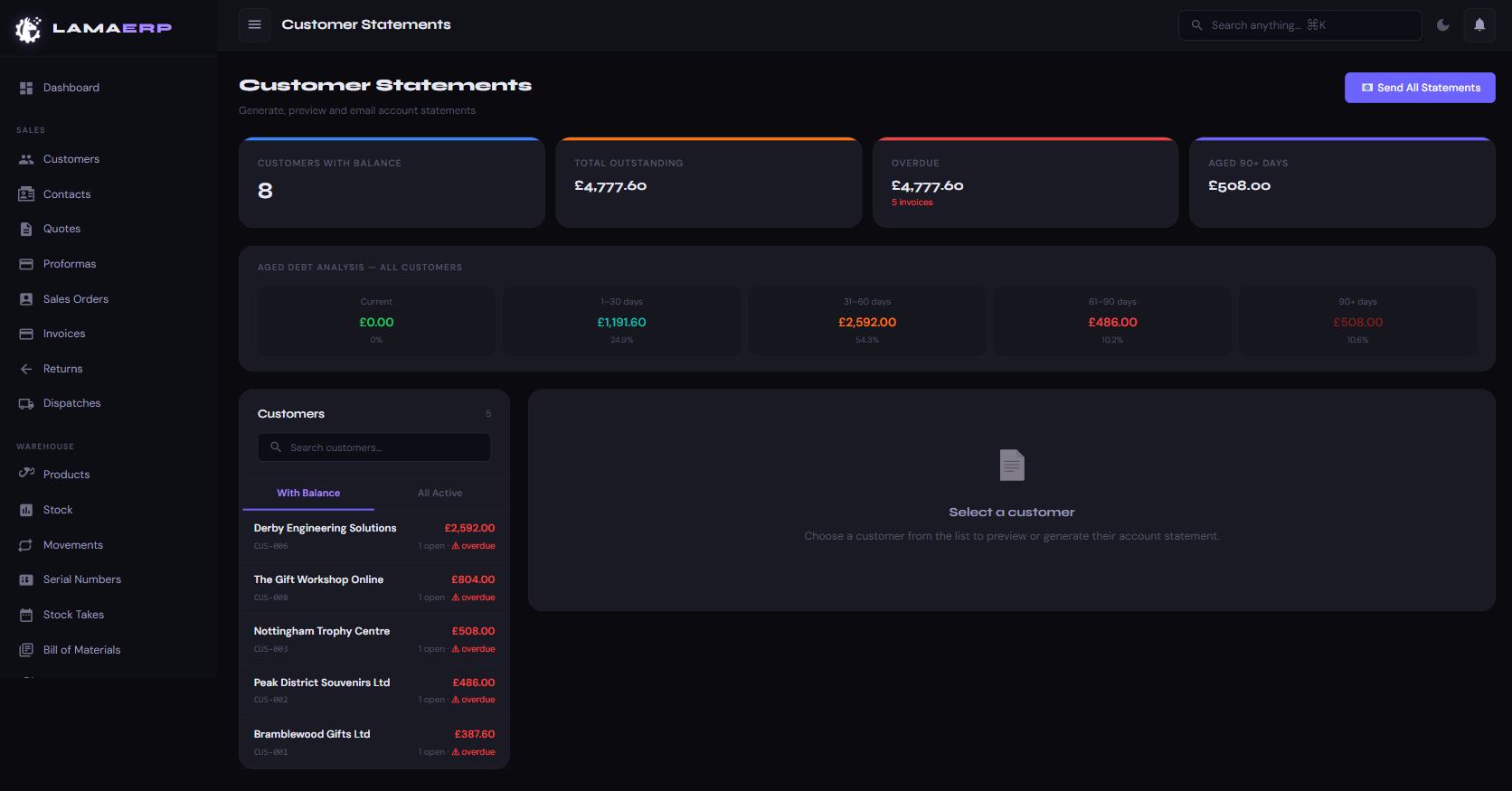
The Statements module shows all customers with outstanding balances and lets you preview, print or email their account statement in one click.
Sending Statements
- Individual: Click a customer name → preview loads on the right → click Email Statement.
- Bulk: Click Send All Statements to email every customer with an outstanding balance simultaneously.
The statement PDF shows all open invoices with their due dates, payment history and the total outstanding. The aged debt grid at the top summarises the portfolio across all age brackets.
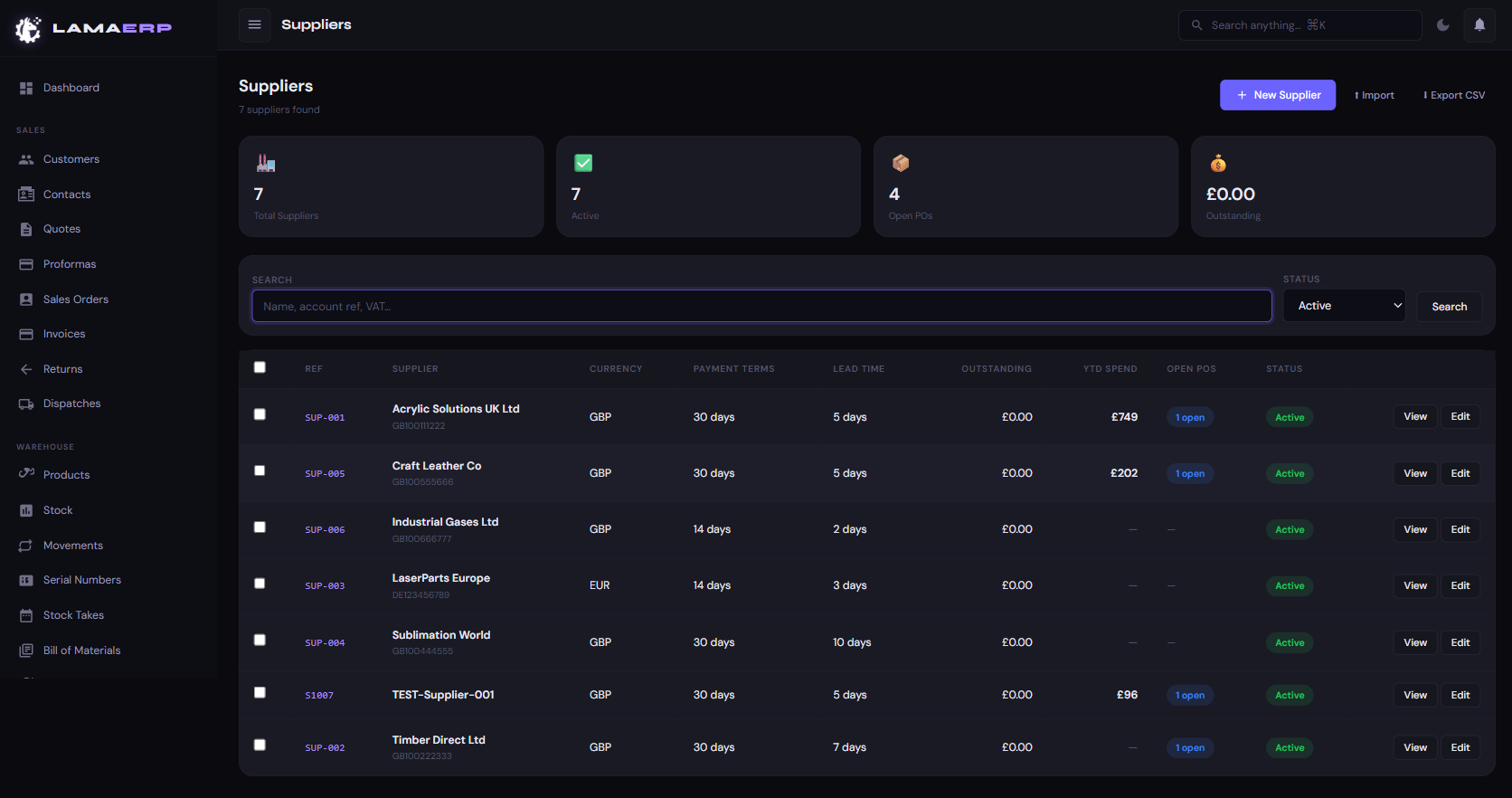
Supplier accounts store the details of everyone you buy from. Each supplier can have their own currency, payment terms, lead time and linked products.
Key Supplier Fields
| Field | Description |
|---|---|
| Account Ref | Unique supplier code (e.g. SUP-001) |
| Currency | The currency this supplier invoices in (GBP, EUR, USD, etc.) |
| Payment Terms | Net 30, Net 60, COD, etc. |
| Lead Time | Typical days from order to delivery — used in reorder calculations |
| VAT Number | Used for EU reverse-charge and VAT reporting |
| YTD Spend | Total spent with this supplier in the current financial year |
| Open POs | Number of purchase orders not yet fully received |
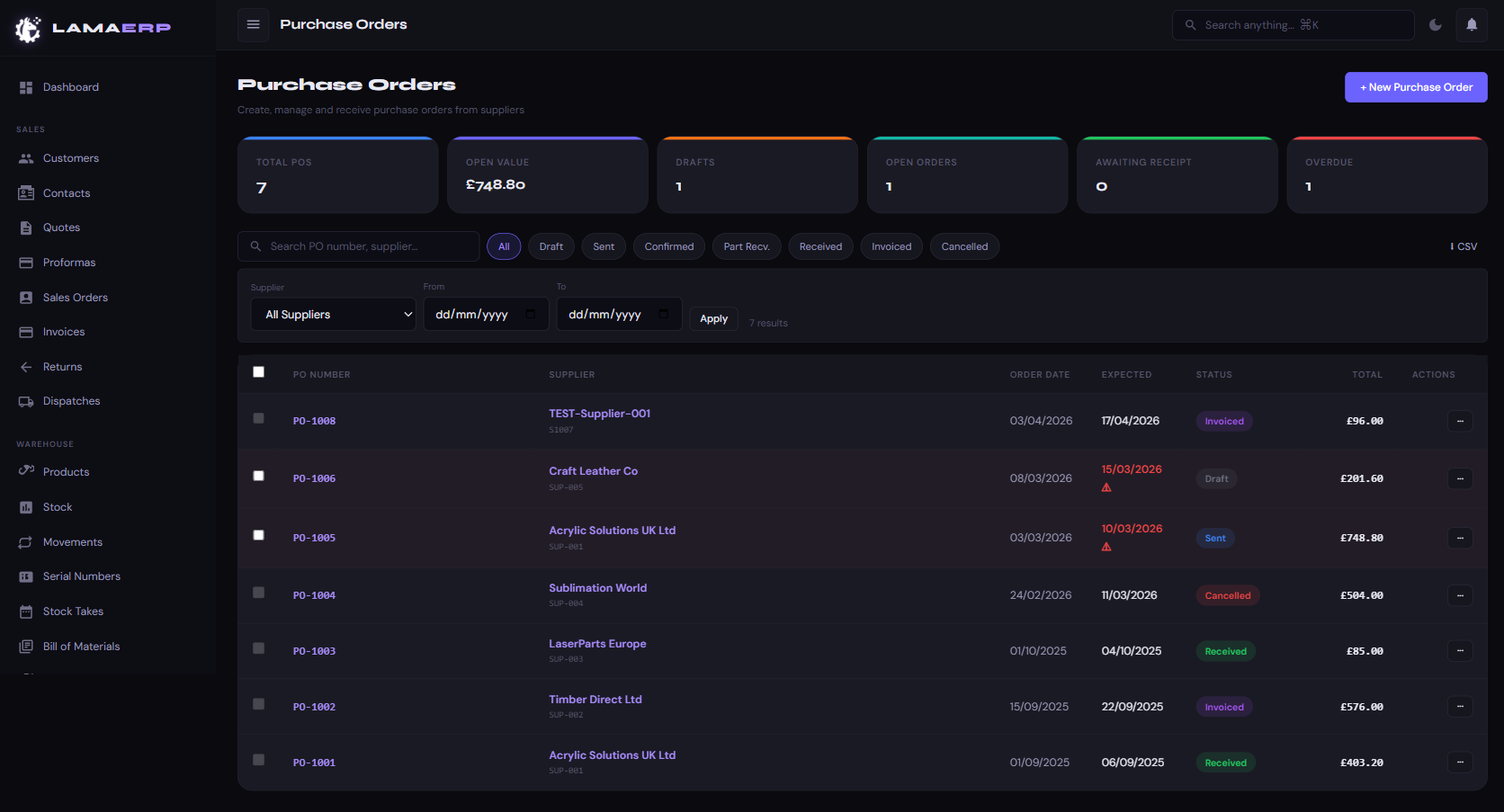
PO Statuses
Creating a Purchase Order
- Click + New Purchase Order.
- Select the Supplier — currency and terms auto-fill from their account.
- Set the Expected Delivery Date.
- Add lines: search by SKU or product name. Cost price and lead time pre-fill from the linked supplier record.
- Save as Draft, then click Send to Supplier when ready — the system emails the PO PDF.
Receiving Stock
- Open the PO and click Receive Goods.
- Enter quantities received per line (partial receipts supported).
- Stock levels update immediately on Save.
- Once fully received, click Create Bill to generate the supplier bill.
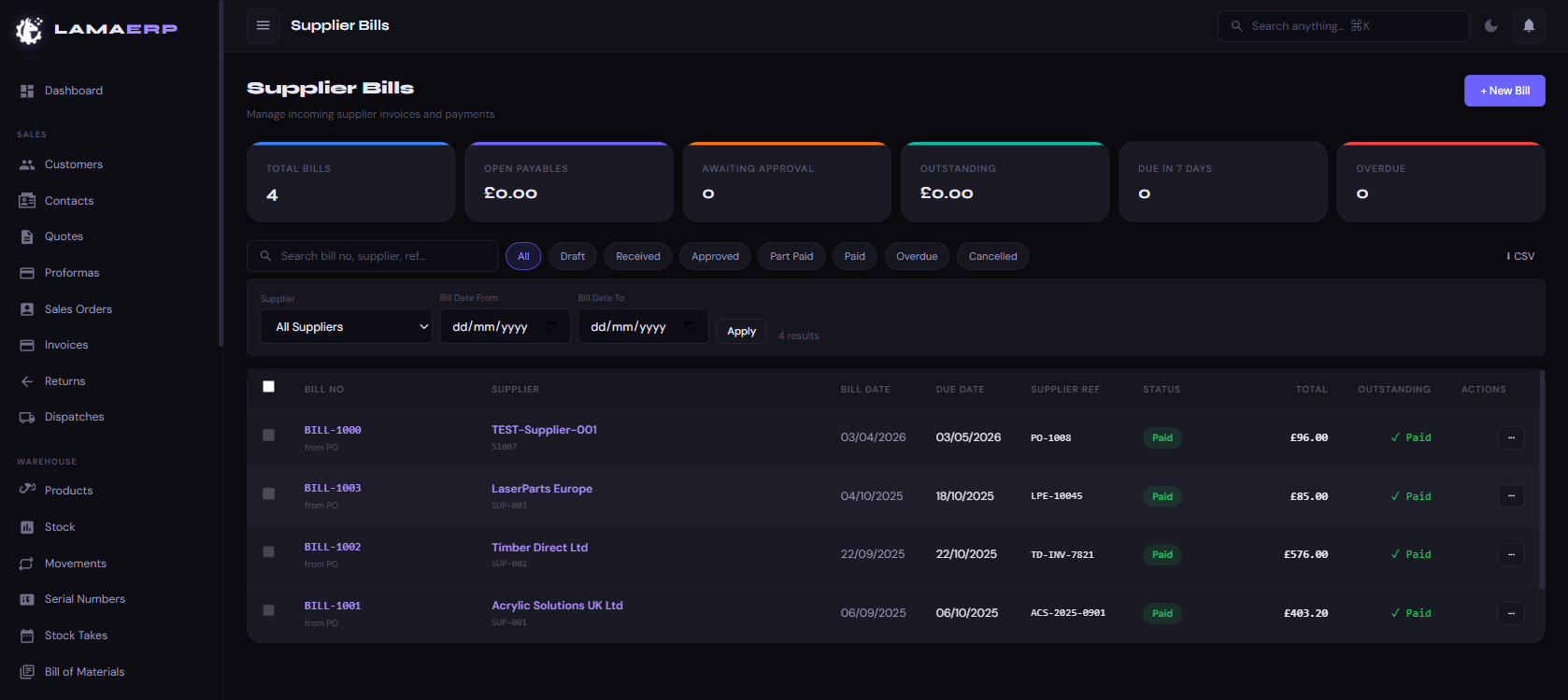
Supplier Bills record the invoices you receive from suppliers. They are your accounts payable ledger. Bills are typically created automatically from a received Purchase Order.
Bill Statuses
Recording a Bill Payment
- Open the bill and click Record Payment.
- Enter amount, date and payment method.
- Full payment marks the bill as Paid and posts the accounting entry.
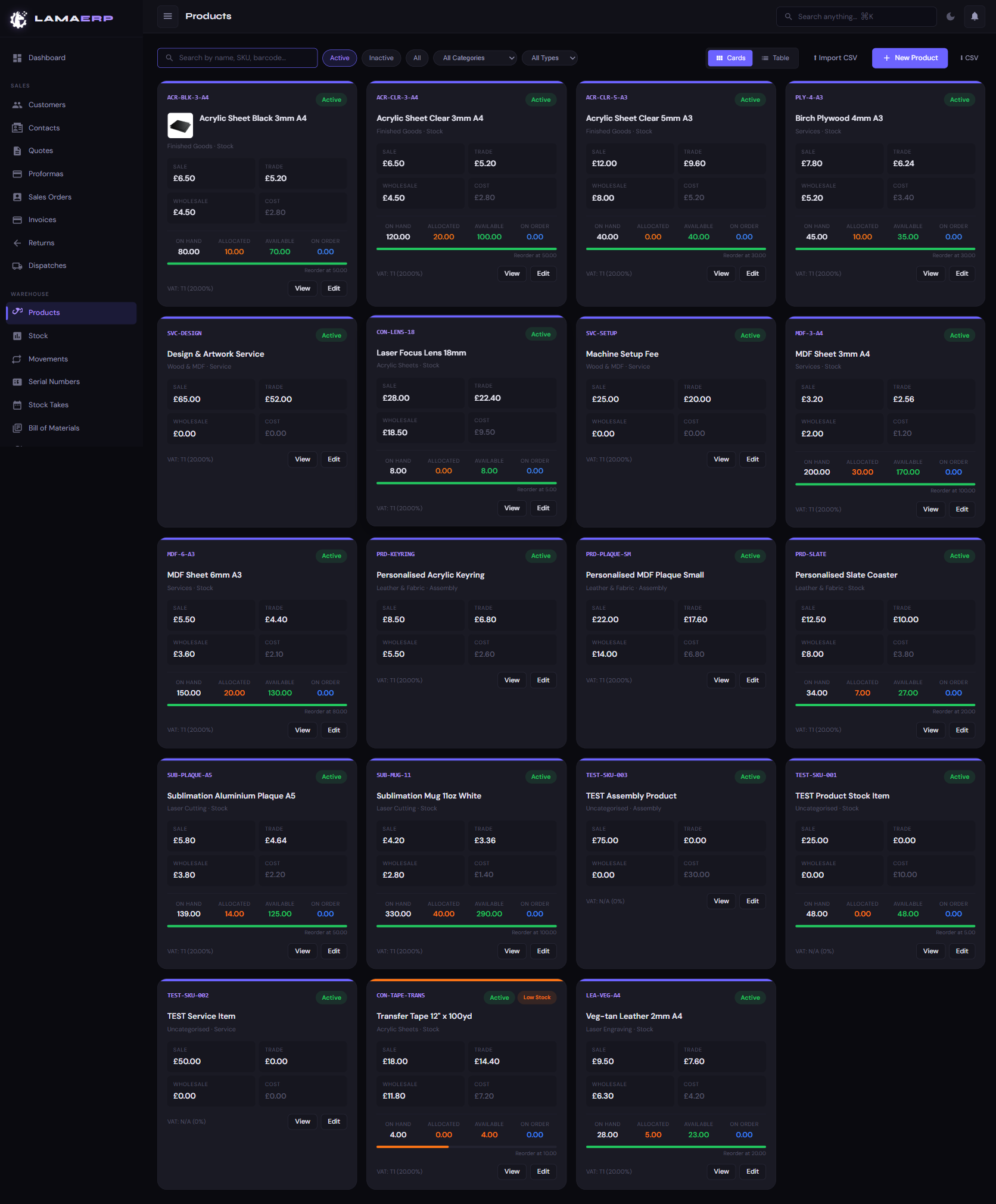
Product Types
| Type | Description |
|---|---|
| Stock | Physical items tracked in inventory. Stock moves on dispatch and receipt. |
| Service | Non-physical items (labour, setup fees). No stock tracking. |
| Assembly | Finished goods built from components via a Bill of Materials. |
Pricing Structure
| Price Tier | Used For |
|---|---|
| Sale Price | Default retail / public price |
| Trade Price | Trade accounts (discounted from sale) |
| Wholesale Price | Wholesale / bulk buyers |
| Cost Price | Your purchase cost — used for margin calculation (never shown to customers) |
Multi-Currency Pricing
The product view page shows a 🌍 Prices in Other Currencies card that converts all price tiers to every active foreign currency using your latest exchange rates. This is ideal for quickly quoting international customers over the phone.
Linked Suppliers
Each product can have multiple linked suppliers with their own SKU, cost price, lead time and minimum order quantity. The Preferred Supplier is used as the default when raising a PO. Manage linked suppliers from the product edit page.
Views
Toggle between Cards view (visual grid with stock indicators) and Table view (compact list). Filter by status (Active / Inactive / Discontinued), category and type.
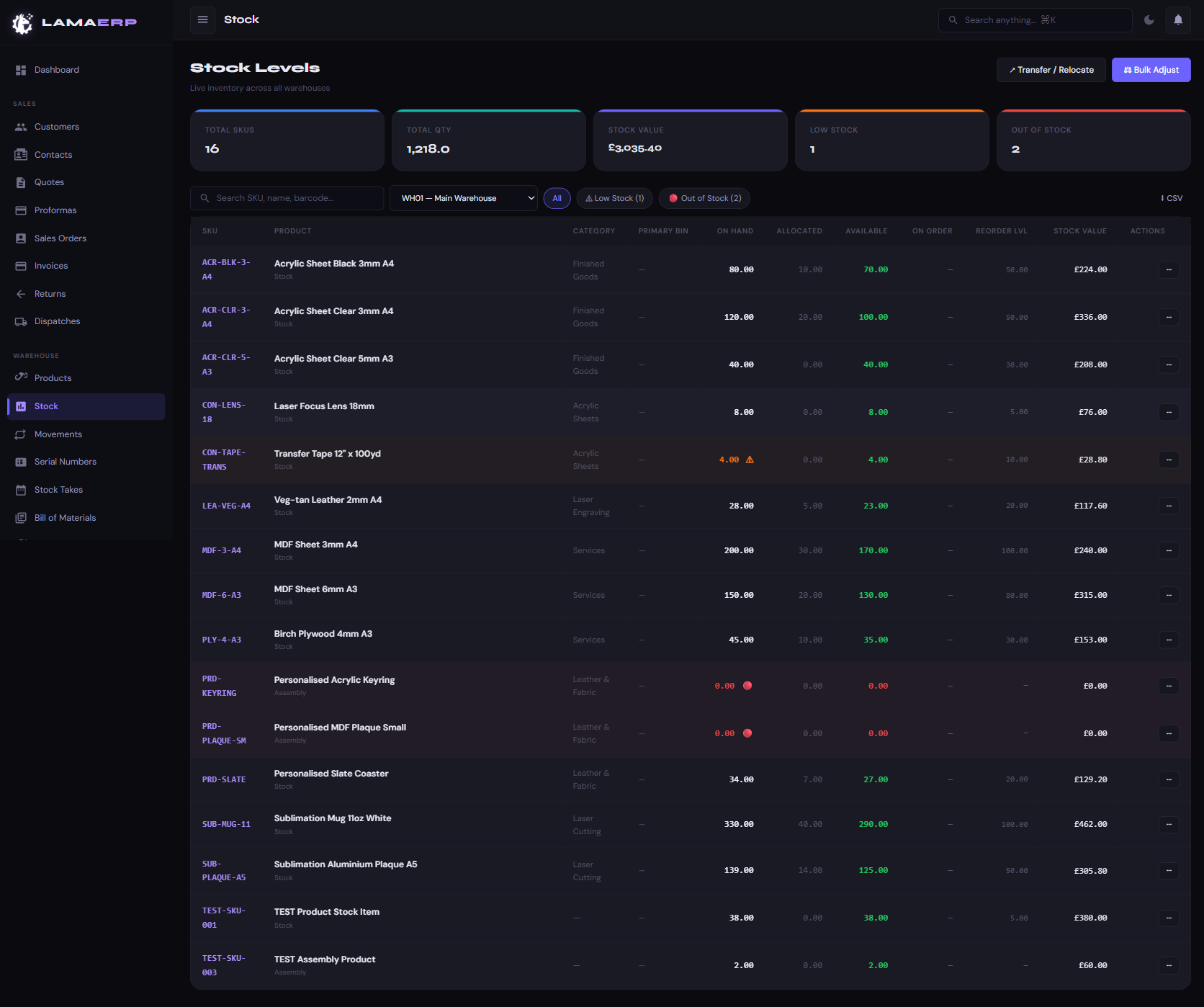
Stock Columns Explained
| Column | Meaning |
|---|---|
| On Hand | Physical quantity currently in the warehouse |
| Allocated | Reserved for confirmed sales orders not yet dispatched |
| Available | On Hand minus Allocated — what can still be sold |
| On Order | Quantity on open Purchase Orders not yet received |
| Reorder Lvl | Threshold that triggers a low-stock alert |
| Stock Value | On Hand × Cost Price |
Adjusting Stock
Click the ··· action menu on any stock line → Adjust. Enter the adjustment quantity (positive = add, negative = reduce) and a reason. All adjustments are logged in the Movements audit trail.
Transferring Stock
Go to ↗ Transfer / Relocate to move stock between warehouses or bin locations. Transfers create movement records on both sides.
Movements & Serial Numbers
The Movements sidebar link shows a full chronological log of every stock in/out. Serial Numbers tracks individual unit serial numbers for serialised products.
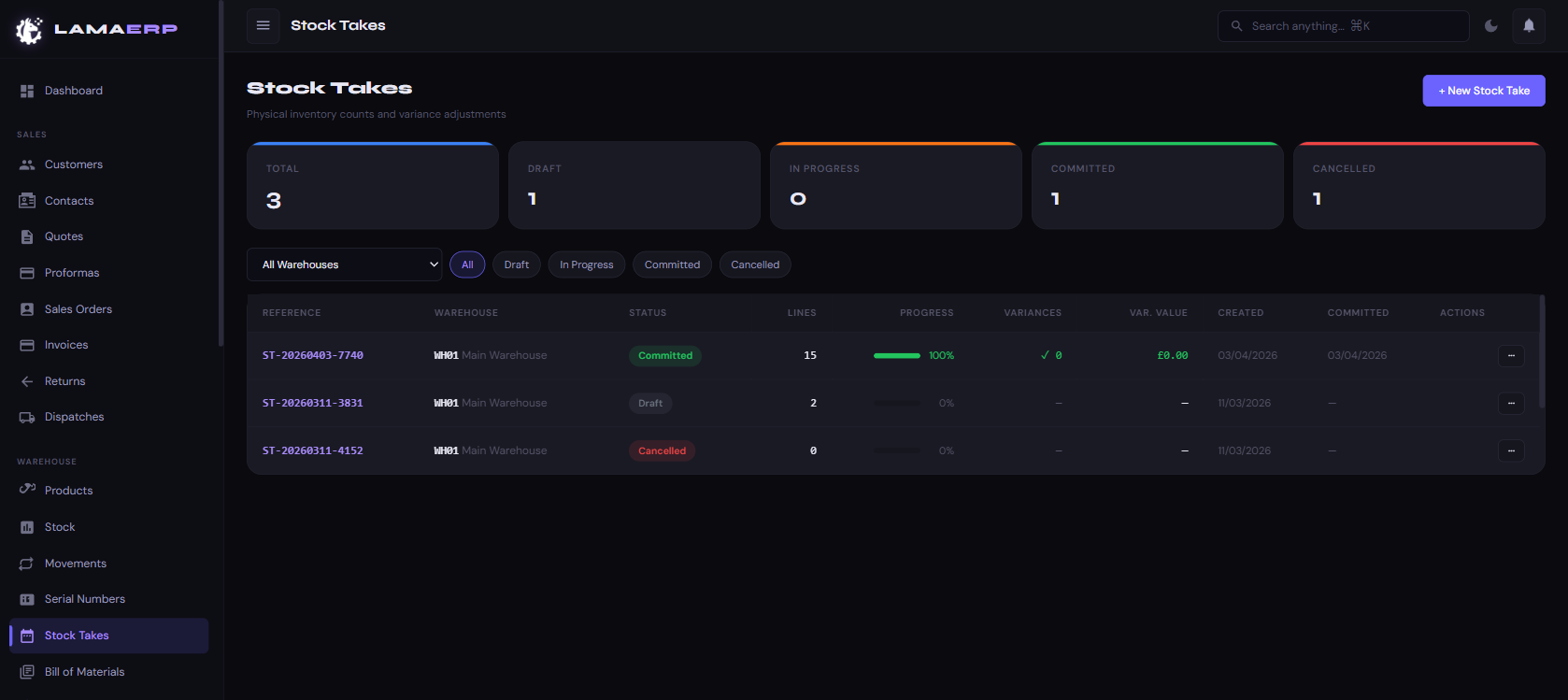
A Stock Take is a physical count of inventory. LAMA ERP compares your counted quantities against the system's on-hand quantities and calculates variances.
Running a Stock Take
Once Committed, stock levels are updated and variance adjustments are posted. The stock take is locked and cannot be edited.
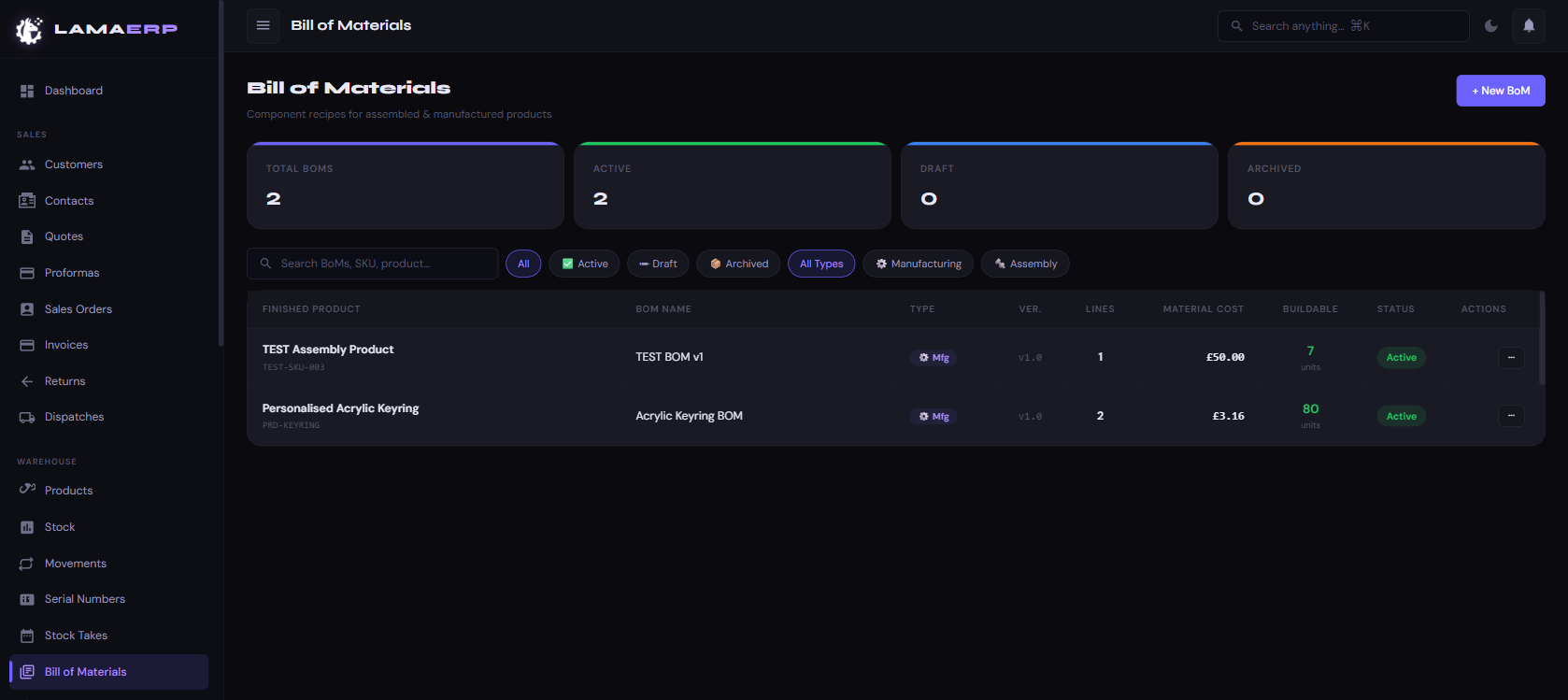
A Bill of Materials (BoM) defines the components and quantities needed to produce one unit of a finished product. BoMs are used to drive Work Orders and calculate material costs.
BoM Fields
| Field | Description |
|---|---|
| Finished Product | The Assembly product being produced |
| Type | Manufacturing (consumes stock) or Assembly (kitting) |
| Version | Version number — old versions are archived, not deleted |
| Lines | Component SKUs and quantities per finished unit |
| Material Cost | Calculated total cost of all components |
| Buildable | How many units can be built with current available stock |
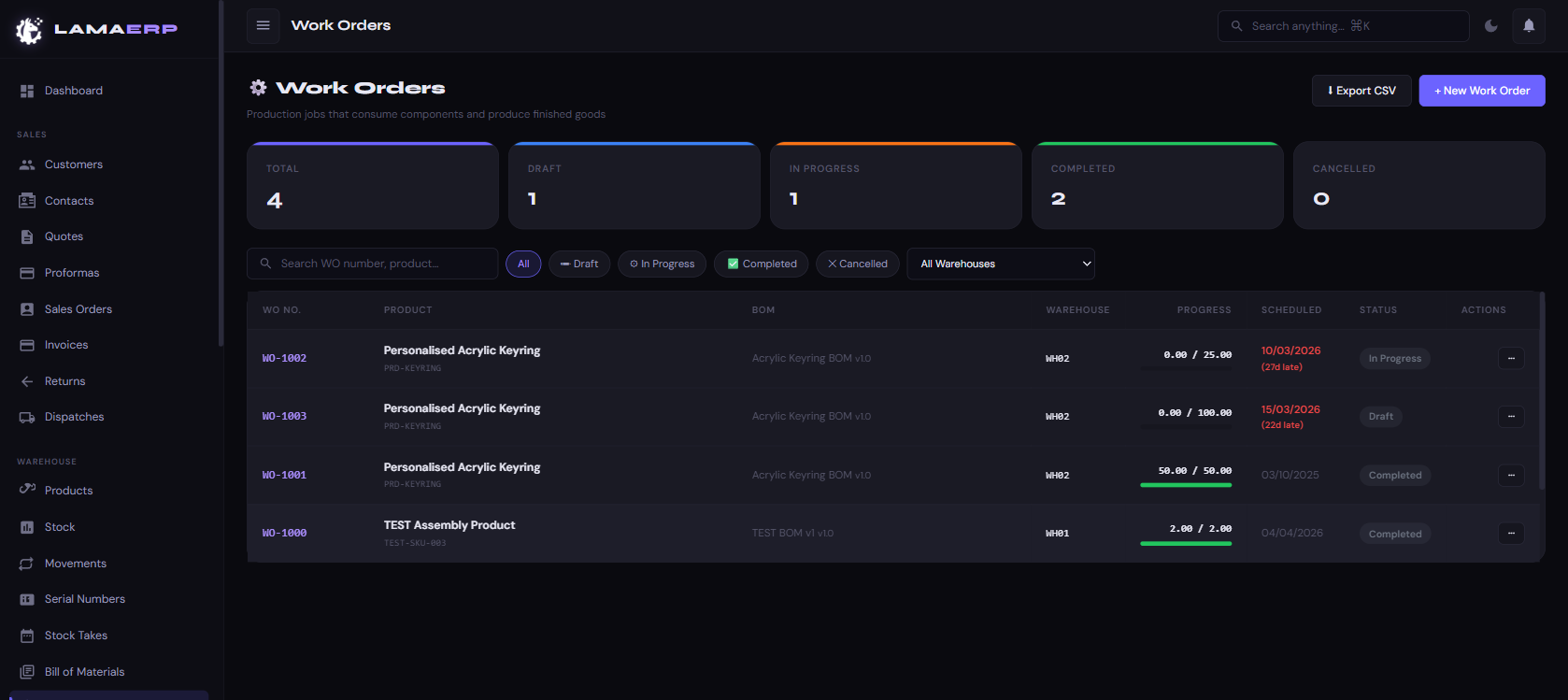
A Work Order triggers production. It consumes component stock (as defined in the BoM) and adds finished goods stock when completed.
Work Order Statuses
Completing a Work Order
- Open the Work Order and click Start Production.
- As units are produced, record the output quantity.
- When done, click Complete — component stock is deducted and finished goods stock is added.
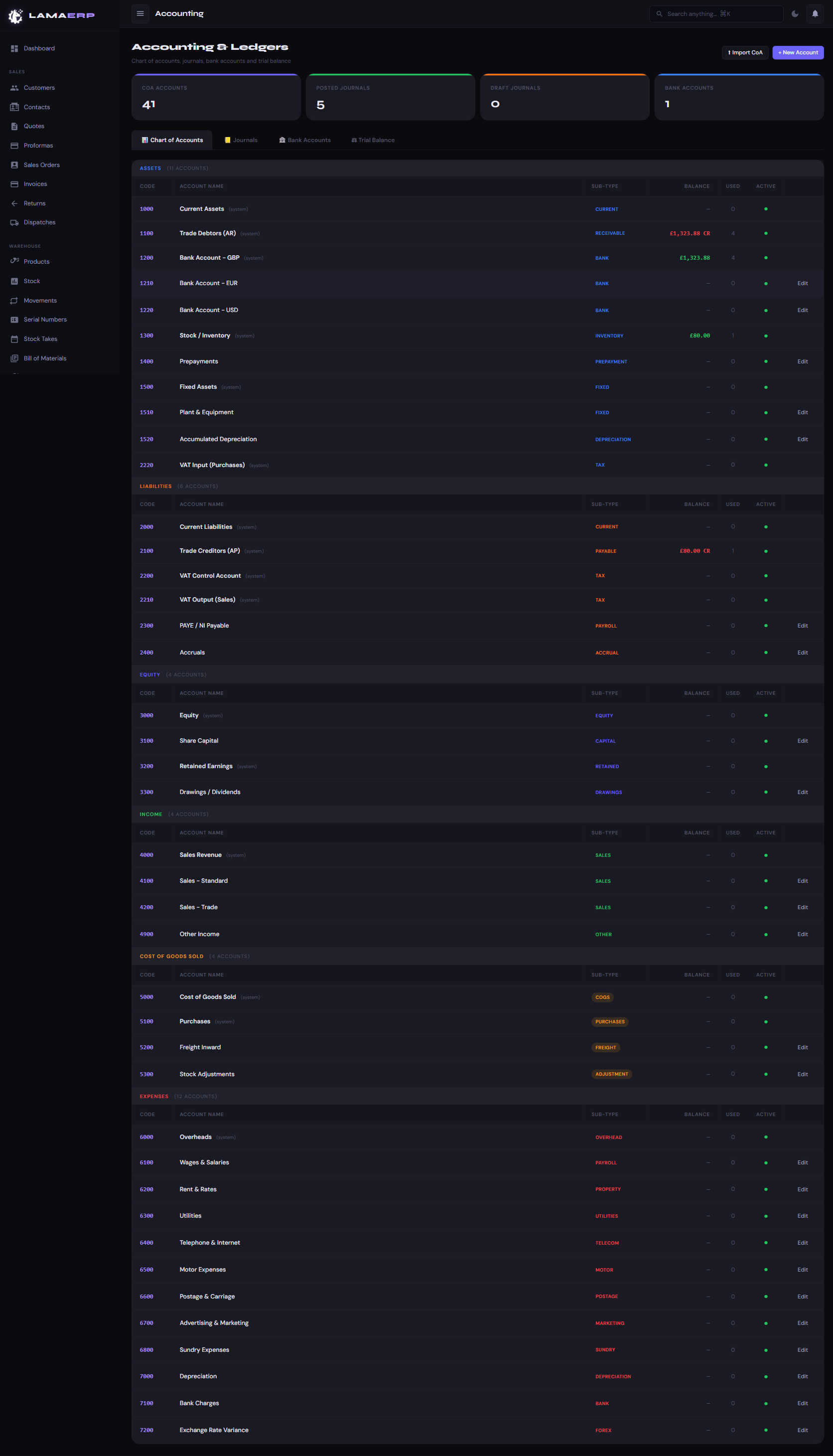
The Accounting module provides the financial backbone of LAMA ERP. Every sales invoice, supplier bill and payment automatically posts double-entry journal entries.
Accounting Tabs
| Tab | Contents |
|---|---|
| Chart of Accounts | All ledger accounts grouped by Assets, Liabilities, Equity, Revenue, COGS and Expenses |
| Journals | All posted journal entries — filter by date, account or reference |
| Bank Accounts | Bank account balances used for reconciliation |
| Trial Balance | Debit and credit totals for all accounts at any date |
Account Code Structure
| Range | Type |
|---|---|
| 1000–1999 | Assets (current, fixed, inventory) |
| 2000–2999 | Liabilities (payables, VAT, accruals) |
| 3000–3999 | Equity (share capital, retained earnings) |
| 4000–4999 | Revenue (sales income) |
| 5000–5999 | Cost of Goods Sold |
| 6000–7999 | Expenses (overheads, wages, utilities) |
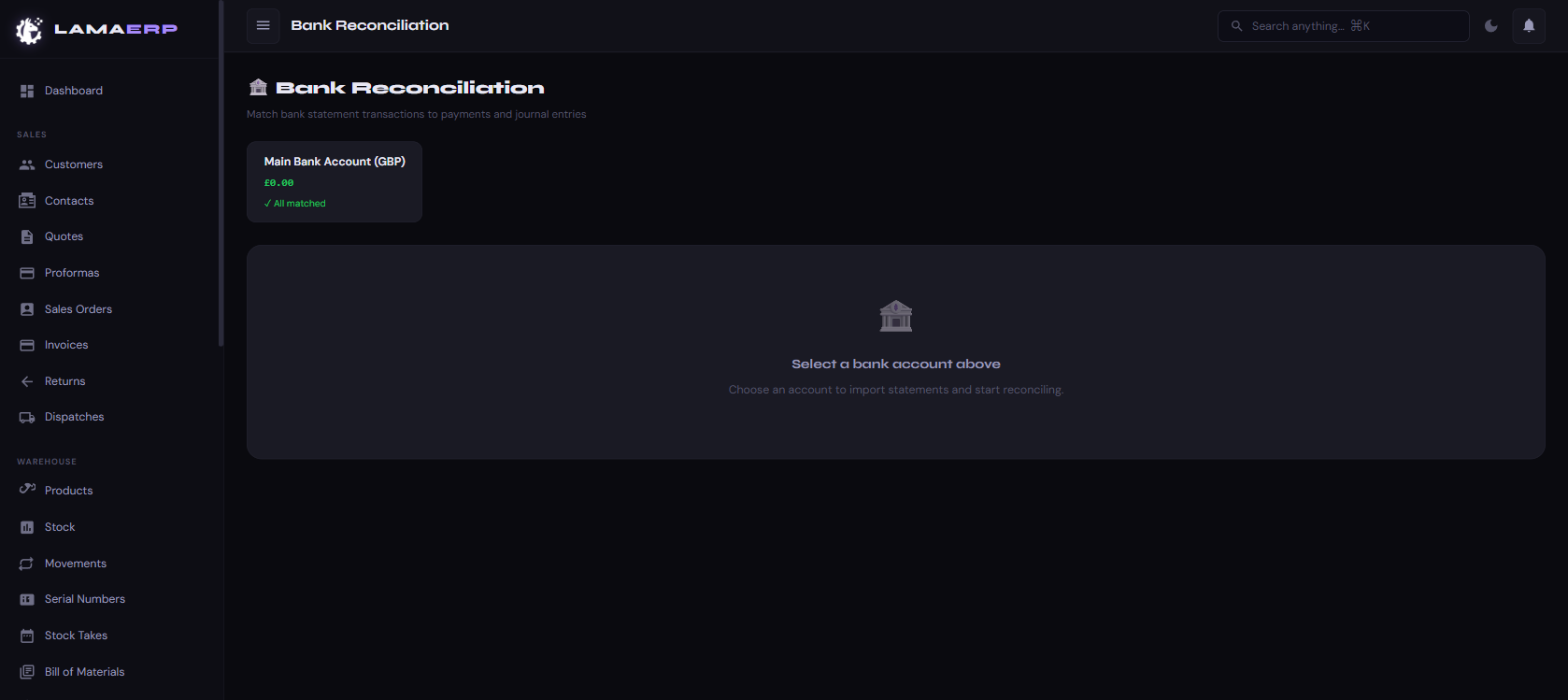
Bank Reconciliation ensures your accounting records match your actual bank statements. Import a bank statement CSV and LAMA ERP will match transactions to existing payments and journal entries.
Reconciliation Process
- Click a Bank Account card.
- Click Import Statement and upload your bank CSV export.
- LAMA ERP automatically matches transactions to invoices, bills and journals.
- Review unmatched items — manually match or create new journal entries.
- Mark the statement period as reconciled.
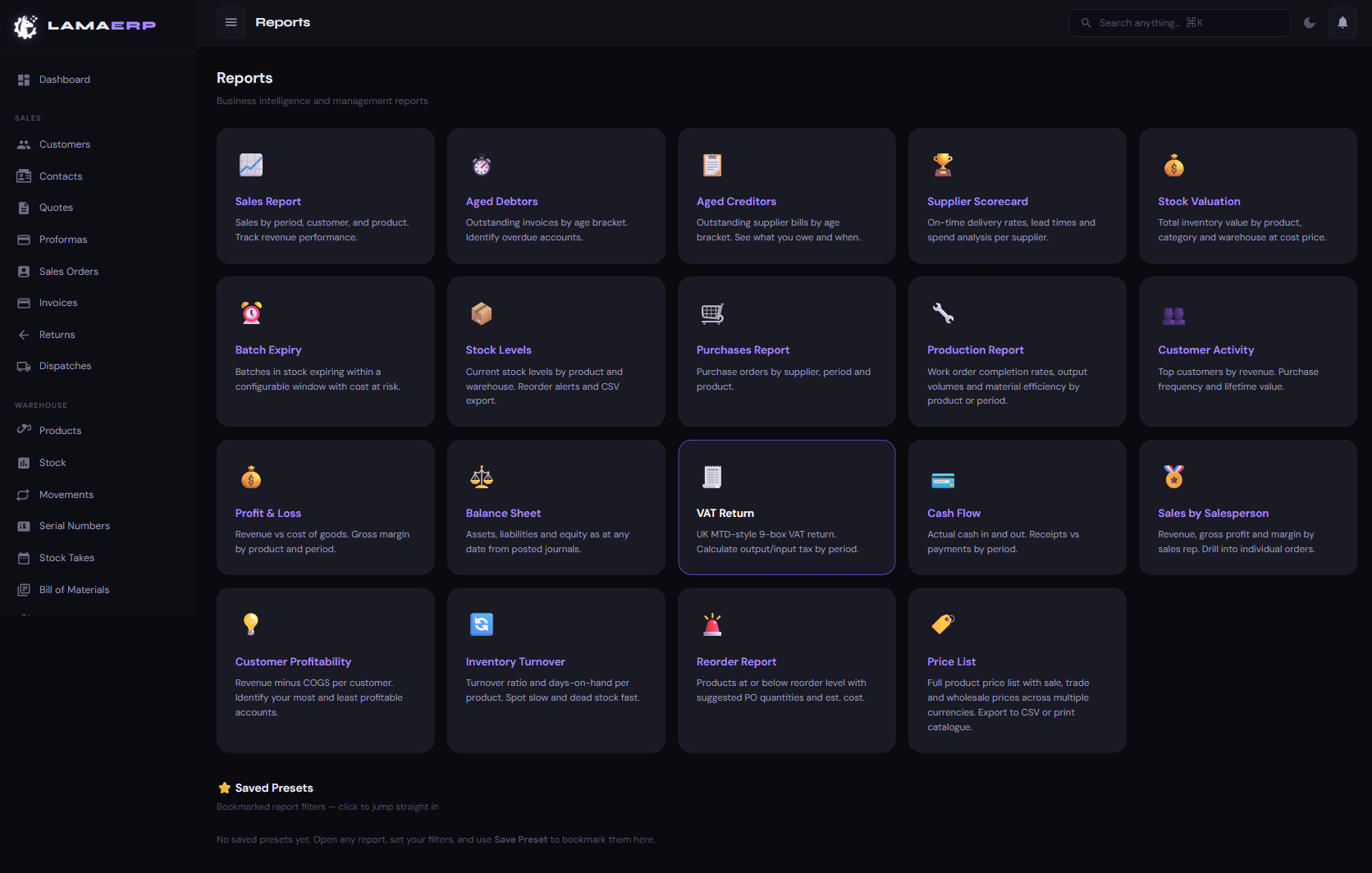
| Report | What it shows |
|---|---|
| Sales Report | Revenue by period, customer and product. Track performance over time. |
| Aged Debtors | Outstanding customer invoices by age bracket. Identify overdue accounts. |
| Aged Creditors | Outstanding supplier bills by age. See what you owe and when. |
| Supplier Scorecard | On-time delivery rates, lead times and spend per supplier. |
| Stock Valuation | Total inventory value by product, category and warehouse at cost price. |
| Batch Expiry | Batches expiring within a configurable window with cost at risk. |
| Stock Levels | Current stock with reorder alerts. CSV export available. |
| Purchases Report | Purchase orders by supplier, period and product. |
| Production Report | Work order completion rates and material efficiency. |
| Customer Activity | Top customers by revenue, purchase frequency and lifetime value. |
| Profit & Loss | Revenue vs COGS. Gross margin by product and period. |
| Balance Sheet | Assets, liabilities and equity as at any date from posted journals. |
| VAT Return | UK MTD-style 9-box VAT return. Calculate output/input tax by period. |
| Cash Flow | Actual cash in and out. Receipts vs payments by period. |
| Sales by Salesperson | Revenue, gross profit and margin by sales rep. |
| Customer Profitability | Revenue minus COGS per customer. |
| Inventory Turnover | Turnover ratio and days-on-hand per product. |
| Reorder Report | Products at or below reorder level with suggested PO quantities. |
| Price List | Full product price list — see Chapter 24. |
Saved Presets
Open any report, set your filters, and click Save Preset to bookmark that filter combination. Presets appear at the bottom of the Reports hub for quick access.
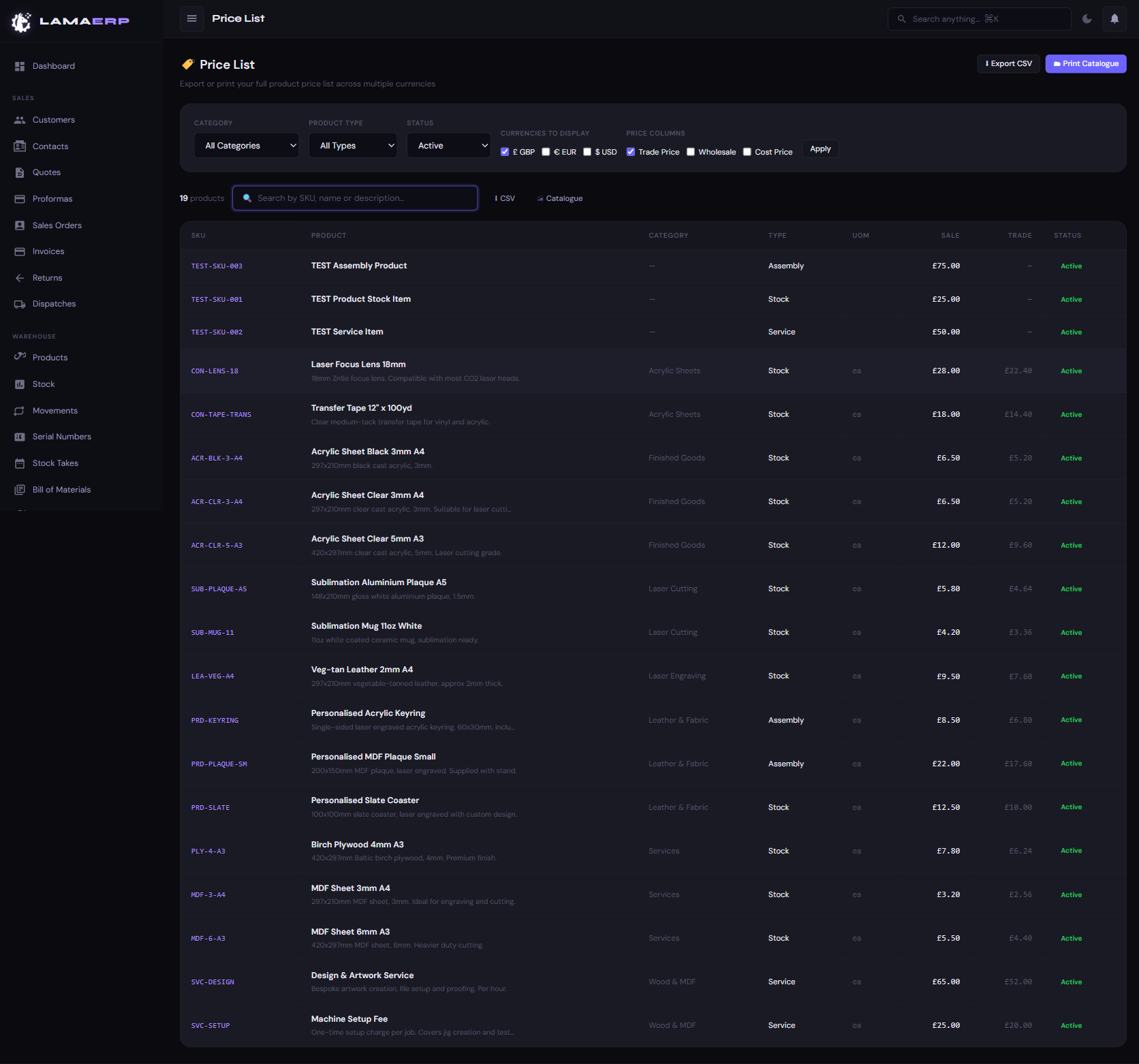
The Price List report shows every active product with sale, trade and wholesale prices, optionally converted to multiple currencies using your latest exchange rates.
Filter Options
| Filter | Description |
|---|---|
| Category | Limit to a specific product category |
| Product Type | Stock, Service or Assembly |
| Status | Active (default), Inactive, Discontinued, or All |
| Currencies | Tick checkboxes to show price columns in GBP, EUR, USD, etc. |
| Price Columns | Toggle Trade Price, Wholesale and Cost Price columns on/off |
Export Formats
- ⬇ Export CSV — Downloads an Excel-compatible spreadsheet with all price columns.
- 🗂 Print Catalogue — Opens a print-optimised catalogue layout grouped by category. Use browser Print → Save as PDF to generate a branded PDF catalogue.
Live Search (Quick Price Lookup)
The search box at the top of the price list filters products instantly by SKU, name or description. Designed for telephone price queries — a customer calls asking for a price, type the product name and all prices (including foreign currencies) appear immediately.
The Customer Portal gives your customers secure, read-only access to their own account information — without them needing access to the main LAMA ERP system.
Portal Sections (Customer View)
| Section | What the customer can see |
|---|---|
| Home | Account summary — open invoices, outstanding balance, open orders, open quotes |
| Invoices | All invoices with status, amount and PDF download link |
| Orders | Open and in-progress sales orders with line items and their own PO reference |
| Quotes | All quotes — customers can accept or decline quotes directly |
| Tracking | Dispatch status and courier tracking numbers for recent shipments |
| Support | Contact form to send a message directly to your team |
Granting Portal Access
- Open the customer record and click the Portal tab.
- Click Generate Portal Link.
- Copy and send the unique link to the customer. No password is required — the link contains a secure token.
- To revoke access, click Revoke next to the link.
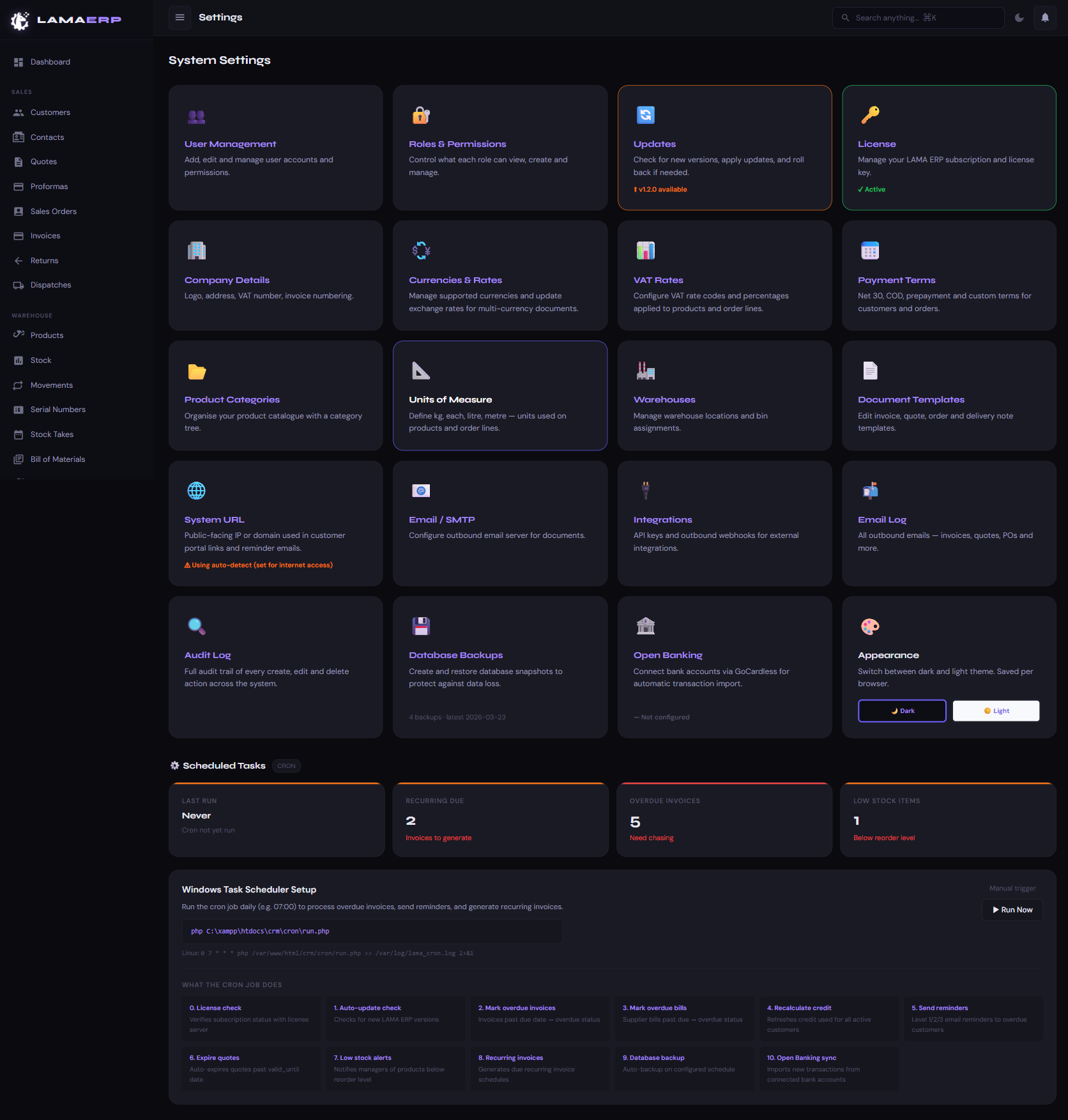
| Setting | Description |
|---|---|
| User Management | Add, edit and deactivate user accounts. Reset passwords. |
| Roles & Permissions | Control which modules each role can view, create and manage. |
| Company Details | Logo, address, VAT number, invoice numbering prefix. |
| Currencies & Rates | Enable currencies and enter exchange rates for multi-currency documents. |
| VAT Rates | Configure VAT codes (Standard 20%, Zero, Exempt) applied to products and lines. |
| Payment Terms | Define Net 30, Net 60, COD and custom terms available on customers and orders. |
| Product Categories | Organise your product catalogue with a category tree. |
| Units of Measure | Define kg, each, litre, metre — units used on products and order lines. |
| Warehouses | Manage warehouse locations and bin assignments. |
| Document Templates | Edit the layout and content of invoice, quote, order and delivery note PDFs. |
| Email / SMTP | Configure outbound email server for sending documents. |
| Integrations | API keys and outbound webhooks for connecting external systems. |
| Audit Log | Full audit trail of every create, edit and delete action with user and timestamp. |
| Database Backups | Create and restore database snapshots to protect against data loss. |
| Open Banking | GoCardless connection for automatic bank transaction import. |
| Appearance | Switch between dark and light theme. Saved per browser. |
| Scheduled Tasks | Configure automated tasks for recurring invoices, overdue chasing and low-stock alerts. |
LAMA ERP v1.0 ·
User Manual generated 14 September 2026For support, contact us at https://lama-erp.com